Hypertext Markup Language or HTML is the standard markup language utilised to create and structure the various elements that make up a webpage.
Tags
These are the instructions like the "span"tag that inform a web browser about how the content of a webpage should be displayed.
Attributes
Adding an attribute to a tag provides additional context, while defining and shaping how the tag will behave.
Head, Body and Footer
Head
This is the section that contains the meta-information of a webpage that doesn’t present on the page itself but is important for web browsers. This generally includes but is not limited to, the title, character encoding and links to stylesheets, scripts and other external resources etc. What it doesn’t contain is the actual content that presents on the page itself i.e. text, images, videos etc.
Body
This is the section that contains the content of a webpage that is visible to a user, such as the text, images and videos etc.
Footer
This section generally appears at the bottom of any given webpage and tends to provide additional context. It contains information about the author, copywrite notices, links to relevant documents/ resources and navigation options.
Navigation Bar
This element of a webpage’s user interface contains the navigation options users can utilise to move between the different sections of a website.
It tends to include links to the home page, contact page and other essential pages.
To create a navigation bar for a webpage using HTML you would need to code an unordered list(ul) containing anchor tags(a) for each relevant link.
Lists
HTML allows for the creation of both ordered(ol) and unordered list(ul) which can be used to organise the information on a website in a structured format.
Lists can be used to create navigation bars or display steps of a process.
Ordered lists indicate a specific order for each item contained, while unordered lists have no specific order or sequence for each of its items.
Un-ordered list
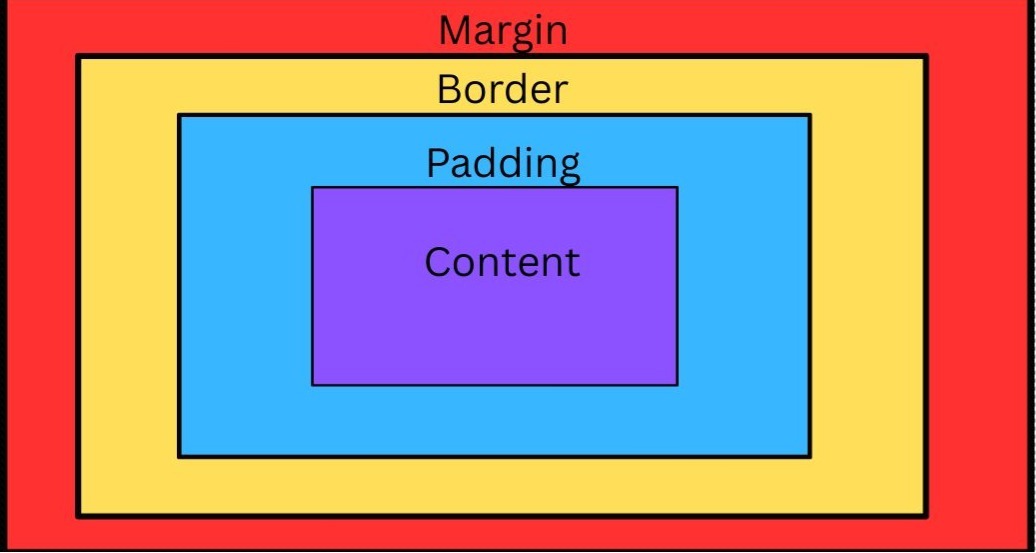
Content
Padding
Border
Margin
Un-ordered list
Content
Padding
Border
Margin
Images
Images are a great way of conveying information visually and making a website more appealing to users.
Utilising HTML, these elements tend to be added to a webpage by using an image tag(img) using either the src attribute. Images can also be modified by using attributes like height and width
Links
These elements allow users to navigate the web, whether it’s between different webpages or between the sections and resources on a specific website.
Links can be created utilising HTML by using the anchor tag(a)
Cascading style sheets is a tool that can be used to configure the various elements of an HTML document, everything from the color, text and even how the page is structured can be adjusted.
Though different browsers can sometimes interpret CCS code differently.
This webpage is a good example of webpage elements that have been configured with CSS
Classes and ID’s
Are both attributes that can be used to format or style elements of HMTL with CSS.
Classes can be applied to multiple elements in a HTML document while ID’s are generally applied to unique elements or utilised for JavaScript functions.
Box model
The CSS Box model is a fundamental layout concept commonly used when formatting the elements of a webpage. Using the model, each of the elements on a webpage are treated like a rectangular boxes and are generally nestled inside each other.
The four components to this model are as follows
FlexBox
FlexBox is a type of CSS layout model that can be used to organise the elements of a site. This type of CSS model is particularly useful for the vertical and horizontal alignment of elements.
Javascript
Javascript is a type of programming language that can be used to create and control dynamic elements for a website.
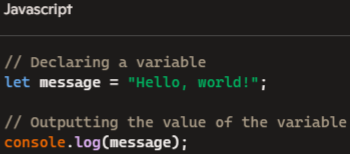
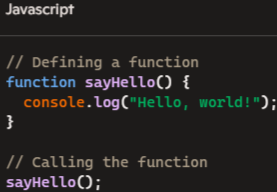
Below are some examples of some fundamental concepts in javascript.
Variables
In programming variables are a line of code that we use like a container, in that we assign a name too and then use to store a value. These variables can be “called” when the value store inside is needed.
Functions
These are blocks of codes designed to perform a certain task, these Functions can be “called” to perform their task multiple times throughout a program.
Events
Javascript events are a fundamental aspect of creating interactive and responsive web applications for users.
Any kind of action or occurrence that can happen in a browser fall under this category. Some examples include but are not limited to, user interactions like clicking a button, submitting a form online or even a custom created event.
Content management system
A content management system (CMS) is a type of software application a web developer can use to build dynamic websites.
These programs allow users to create, edit and publish various types of digital content.
One of, if not, the most popular CMS is Wordpress.